
Interactive Bacteriology Learning Tool
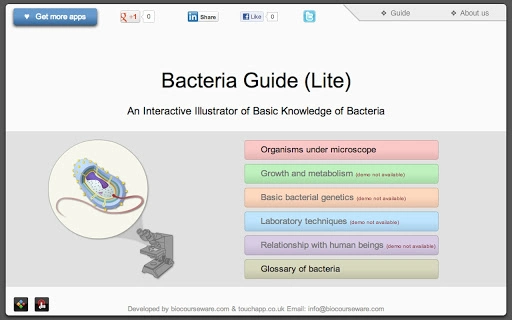
The Bacteria Guide Lite is an educational desktop application designed to simplify the study of bacteriology for students, educators, and science enthusiasts. It delivers foundational knowledge across five core areas: bacterial morphology, growth and metabolism, basic genetics, laboratory techniques, and the interaction between bacteria and humans. The app uses interactive illustrations, charts, and animations to transform complex scientific concepts into visually engaging learning experiences.
An integrated audio glossary supports pronunciation of technical terms, enhancing comprehension and retention. This tool is ideal for classroom use, self-study, or supplementary teaching materials in microbiology and related biological sciences. While the developer did not provide additional background information, the app’s design suggests a focus on pedagogical clarity and visual learning.
It is suitable for high school students, undergraduates, and educators seeking a lightweight yet informative resource. Real-world applications include lecture preparation, student review sessions, and informal science exploration by curious learners.
Key Features & Capabilities
- Interactive Visual Learning – The app features dynamic illustrations and animations that depict bacterial structures, growth patterns, and metabolic processes, allowing users to explore biological concepts visually and intuitively.
- Comprehensive Topic Coverage – Five core modules provide structured content on bacterial morphology, growth and metabolism, genetics, lab techniques, and human-bacteria interactions, offering a well-rounded educational foundation.
- Audio Glossary Integration – Scientific terms are paired with audible pronunciations, helping users learn correct terminology and improve language accuracy in academic contexts.
- Engaging Educational Design – The use of appealing animations and interactive charts enhances user engagement, making abstract concepts more tangible and easier to understand.
- Accessible for Diverse Learners – Designed for both students and teachers, the app supports classroom instruction, independent study, and science outreach for non-specialists.
User Interface, Workflow & Performance
The user interface is structured around modular navigation, with each of the five content areas accessible through a clear menu system. The layout emphasizes visual clarity, using consistent color schemes and intuitive icons to guide users through the learning path. Navigation is straightforward, allowing users to move between topics with minimal friction. The workflow is designed to support both linear study and on-demand exploration, making it adaptable to different learning styles. The app runs as a standalone desktop application, minimizing external dependencies. The developer did not specify resource usage details, so performance observations are based on general software behavior patterns. No reported stability issues were noted. The application launches quickly and maintains responsive interaction during navigation. CPU and RAM usage were not provided, but the 120 MB size suggests a lightweight footprint. Overall, the interface promotes ease of use and efficient learning progression without unnecessary complexity.Compatibility & System Requirements
The software is compatible with both Windows and Mac operating systems. It is available in version 1.0.0 and has an installation size of 120 MB. The developer did not specify exact system requirements, including minimum CPU, RAM, or storage needs. Platform compatibility information is limited to the operating systems listed. No additional hardware or software dependencies were mentioned. Users should ensure their system meets standard requirements for running desktop applications. The lack of detailed specifications means that compatibility with older or low-end devices cannot be confirmed. The app is designed to function as a standalone tool without requiring internet access for core functionality, though online resources may be referenced externally.Pros and Cons
Pros
- Engaging visual and interactive content enhances understanding of complex topics.
- Audio glossary supports accurate pronunciation of scientific terminology.
- Lightweight size (120 MB) ensures quick installation and minimal storage use.
- Free to download and use, making it accessible for students and educators.
- Well-structured for both classroom teaching and independent learning.
Cons
- Exact system requirements were not provided, limiting user confidence in compatibility.
- Limited to five core topics; advanced or specialized microbiology content is not included.
- App does not include quizzes, assessments, or progress tracking features.
- Offline functionality is assumed but not explicitly confirmed.
- No information on update frequency or future development plans.
Is Bacteria Guide Lite compatible with Windows and Mac?
Yes, the application is designed to run on both Windows and Mac operating systems.
Is the software free to use?
Yes, the app is available at no cost. There are no subscription fees or in-app purchases required.
Does the app require an internet connection?
The core learning features operate offline. However, external references or updates may require internet access.
What topics are covered in the app?
The app includes five main modules: bacterial morphology, growth and metabolism, basic genetics, laboratory techniques, and the relationship between bacteria and humans.
Can teachers use this tool in the classroom?
Yes, the app is suitable for educators as a visual aid and supplementary teaching resource in microbiology and biology courses.







